
SSC MTS Admit Card 2025 - Download Tier 1 MTS and Havaldar Hall Ticket, Application Status
SSC MTS Admit Card 2025 - The Staff Selection Commission releases the SSC MTS hall ticket for all regions on its official website - ssc.gov.in. Candidates can download the admit card on the regional websites of SSC.
SSC MTS Admit Card 2025: The Staff Selection Commission releases the MTS admit card online at ssc.gov.in. The admit card is issued to registered candidates on the regional websites of SSC. The MTS Havaldar admit card for all regions will be issued at least 7-10 days before the scheduled examination date.
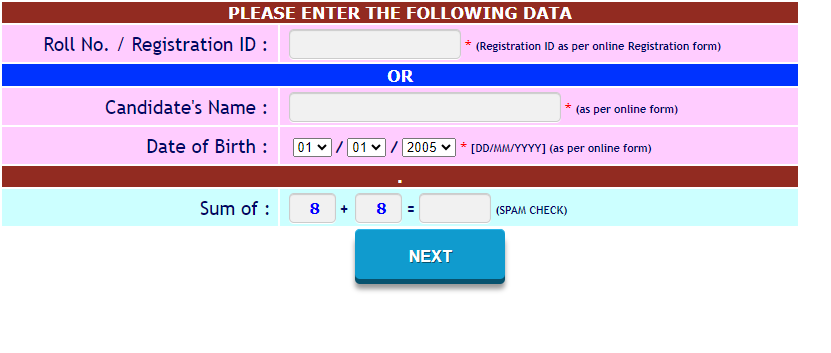
The SSC MTS exam is scheduled to be conducted in September-October 2025. The Staff Selection Commission activates the application status link region-wise on the official websites. The application status link is activated before the release of the actual admit card. Candidates who have registered for the respective regions can check their application status. The candidates must log into the regional website with their registration number and date of birth to download their SSC MTS admit card 2025.
Latest Updates:
- The SSC MTS admit card 2025 and application status will be activated at ssc.gov.in.
- SSC MTS exam 2025 will be conducted tentatively in September-October 2025.
SSC MTS Admit Card 2025 - Direct links to download
The SSC MTS admit card download 2025 link can be checked by applicants below:
| SSC MTS Admit Card 2025 |
|
| Regions | Download Links |
| Northern region | Direct Link |
| Madhya Pradesh region | Direct Link |
| Central region | Direct Link |
| North Western region | Direct Link |
| Eastern region | Direct Link |
| North Eastern region | Direct Link |
| Western region | Direct Link |
| Southern region | Direct Link |
| Karnataka Kerala region | Direct Link |
SSC MTS Admit Card 2025 Release Date
The Staff Selection Commission releases the MTS havaldar hall ticket for candidates who registered for the exam. Usually, the commission issues the admit card 5-7 days before the exam date and the application status is activated at least 10 days before the exam date. Students must know that the hall ticket link and application status are activated at the regional websites of SSC.
|
Particulars |
Details |
|
Name of the Organisation |
Staff Selection Commission |
|
Name of Examination |
Multi-Tasking Staff and Havaldar |
|
Post |
Group ‘C’ |
|
SSC MTS Paper 1 Admit Card |
September 20, 2025 (Tentative) |
|
SSC MTS Paper 1 Exam Date |
September 30, 2025 to November 14, 2025 |
|
SSC MTS Paper 2 Exam Date |
To be Announced |
SSC MTS Application Status - Region wise
SSC MTS Admit Card 2025: Regional Websites
SSC MTS Admit Card 2025 - How to download?
Steps to download the SSC MTS Admit Card
How to download SSC MTS Admit Card Without Roll Number/Password?
SSC MTS Havaldar Admit Card 2025 - Login Window
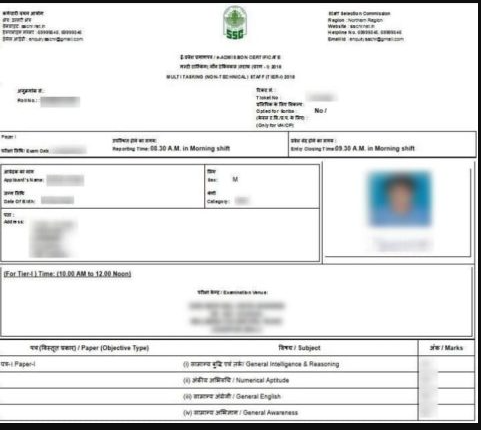
SSC MTS Admit Card 2025: Mentioned Details
MTS Admit Card 2025 - Sample Hall Ticket
Frequently Asked Questions (FAQs)
How can I download the SSC MTS Admit Card for 2025?
To download the SSC MTS Admit Card once it has been released, the candidate must enter their Registration Number/Roll Number, Password, and DOB. If they have forgotten these details, they will be asked to provide other relevant information.
Where can I download my SSC MTS Admit Card?
The links to the SSC MTS Admit Card download will be included in the article, or candidates can access it directly from the respective regional website.
When will the SSC MTS paper 1 Admit Card 2025 be released?
The official release date for SSC MTS admit card 2025 has not been released yet.
What date will the SSC MTS paper 1 Exam be held in 2025?
SSC MTS exam for Multi Tasking and Havaldar posts will be conducted likely in September-October 2025.
Will the admit card for SSC MTS release separately for different rounds?
Staff Selection Commission releases the SSC MTS Admit Card region-wise separately. Moreover, as there are two phases for the exam, the admit card for them will be issued separately as well.
When will SSC MTS admit card be released?
SSC MTS Havaldar admit card will be issued likely 10 days before the scheduled examination date. Before the release of the admit card, the region wise application status will be out for candidates who registered for the exam.

SSC MTS, Havaldar Result 2024 Out: Website to check; cut-off, merit list details here

AP Inter 2025 Board Exams: BIEAP IPE 1st, 2nd year hall tickets released at bie.ap.gov.in

UPSC NDA, NA I Admit Card 2025 Out: Websites to check

SBI Clerk Mains Admit Card 2025 Out: Website to check

RRB NTPC Admit Card 2025: When are admit cards releasing?

JEE Main 2025 Session 2 Admit Card: Hall tickets out for these dates at jeemain.nta.nic.in


Loading...